Marilyn Perry On Essential Drupal Security Modules
Essential Drupal Website Perimeter Security Components

Essential Drupal Security
Timo Ehrenfellner
Implementing Drupal Security features and functionality is relatively simple thanks to several Drupal community developed Drupal functionality extension modules. These site security modules for the Drupal Digital ence Platform (DXP) website development system implement essential website perimeter security functionality. The list of Drupal security modules below enables Drupal projects to combat malware bots, each using varying strategies to defeat malicious web crawling robots of various types.
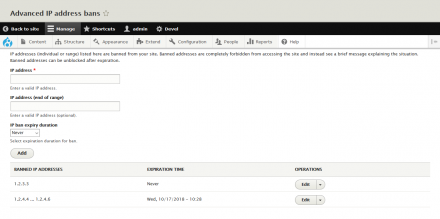
- Advanced Ban - The Drupal Advanced Ban module replaces the Drupal core Ban module. The Drupal Advanced Ban module enables Drupal project administrators to ban visits to their site from unwanted IP addresses. The Drupal Advanced Ban module also includes additional features not provided by the Drupal core Ban module.
- AutoBan - The AutoBan Drupal module also enhances the Drupal core Ban module. The Drupal AutoBan module enables administrators to ban visits from unwanted IP addresses using several techniques and features, such as: automating IP bans using watchdog table and Autban module rules, as well as other methods.
- Antibot - The Drupal Antibot module is designed to eliminate robotic form submissions. The Drupal Antibot module works behind the scenes and doesn't require interaction from end-users. Using JavaScript, the Drupal Antibot module waits for a mouse to move, an enter key or tab key press, or a mobile swipe gesture, before the action of the form is switched to its original path. This indicates to the Antibot module that there is a human behind the form's controls and not a robot or spambot.
- CAPTCHA - The Drupal CAPTCHA module provides data entry form security by presenting a challenge-response test on data entry forms to determine whether the user is human. A CAPTCHA enables forms to block submissions from spambots, which are automated scripts that post spam content everywhere they can. The simple arithmetic / math CAPTCHA style is likely adequate for most websites. However, an excellent alternative, that defeats spambots but which is easy for people is a CAPTCHA style called riddler. An example riddle might be "What country is south of Texas?". Since a Drupal site administrator is able to invent new riddles, such as the example just provided, it would be difficult for a SpamBot to maintain a list of known riddles and answers. Consequently, the riddler CAPTCHA style is an excellent spam prevention methodology.
- Drupal Perimeter Defence - The Drupal Perimeter Defence module bans IP addresses that send suspicious requests to a Drupal website. For example, the Drupal Perimeter Defence module is helpful on Drupal websites that ence requests to URLs that include 'wp-admin', or are *.aspx URLs to a Linux server, both of which are not relevant to a website implement with the Drupal DXP. This type of spambot information is available on the Drupal administration system dblog log display page. Using the Drupal Perimeter Defence module, the URL patterns that result in an IP address ban are configurable on the module's admin settings page.
- Honeypot - The Drupal Honeypot module, employs both the honeypot strategy and the timestamp strategy to deter spambot data entry form submissions on a Drupal website. The Drupal Honeypot module supports individual enablement for each, any, or all, of the forms on a Drupal website. Individual forms, such as the: user registration; password reset; contact; node; and comment; forms can each deploy honeypot protection from malicious web crawling spambots.
- Login Security - The Drupal Login Security module improves the login security options implemented by Drupal websites. With the Drupal Login Security module, a Drupal website administrator can protect and restrict site access by adding control features to a Drupal website's login forms. With the Drupal Login Security module enabled, a Drupal website's administrator can: limit the number of invalid login attempts before blocking accounts or IP addresses; and also, deny access by IP address, temporarily or permanently. The Drupal Login Security module can also disable Drupal core's login error messages, obfuscating the reason for a login failure. This feature may make it more difficult for website attackers to discover whether or not a Drupal website account even exists.
- Obfuscator - The Drupal Obfuscator module enhances Drupal website security by hiding information about the website that may otherwise expose some site security vulnerabilities. For example, the Drupal Obfuscator module hides site construction information from a Drupal website's HTML header that is by default included in it. The Drupal Obfuscator module also hides the Drupal version number from a Drupal website's HTML header. In addition, the Drupal Obfuscator module disables the TRACE and TRACK methods that the Apache web server also emits from a website. The Drupal Obfuscator module developers are considering adding additional, similar, types of site information obfuscation that malicious website spambots and attackers use to determine what type of website they are attacking.
- Spamicide - The Drupal Spamicide module works to prevent spam form submissions by adding an input field to each form that is hidden using CSS. If and when a spambot enters data into the visually hidden field created by the Drupal Spamicide module, the form and its contents get discarded. The hidden field, and its matching .css file, are named so they won't let on that they are an anti-spam protection mechanism. The hidden field can be set by a Drupal website administrator to almost any field name they want, which makes it quite difficult for spambots to guess that the special field is an anti-spam mechanism.
Notably, it is possible, even recommendable, to install and use all of the Drupal website security modules described above simultaneously. The Drupal website security modules above are able to work together harmoniously to help stem the tide of cruft from Spambots and other types of malicious website attackers.
Most Drupal Security module installation and configuration is straightforward, often even minimal. To install and enable the Drupal Security modules described above, first add each of the modules to the Drupal project's composer.json file. Then run the composer PHP package manager composer update command, from the Linux bash command-line in the Drupal project's root directory. The composer utility then adds the code for each module to the Drupal Project's code base. Afterward, at the Drupal project /admin/extend page, enable and configure each of the drupal security modules described above. Some of the Drupal security modules enable a project administrator to - allowlist - IP addresses, such as the IP addresses of the Drupal project's development, maintenance, and content creation staff, so do so. Working together, the Drupal modules described above provide ample perimeter security protection to websites built on the, state of the art, open source, Drupal digital experience platform.
Thank you for visiting this website, my personal website, and hopefully your enjoyment the information and content shared here publicly at www.marilynperry.com. Marilyn Perry | Thursday, February 22, 2024