Windows Calculator Keyboard Shortcuts
Improved Windows Calculator App Keyboard Shortcuts Documentation

wallpaperscraft.com
Windows Calculator Keyboard Shortcuts
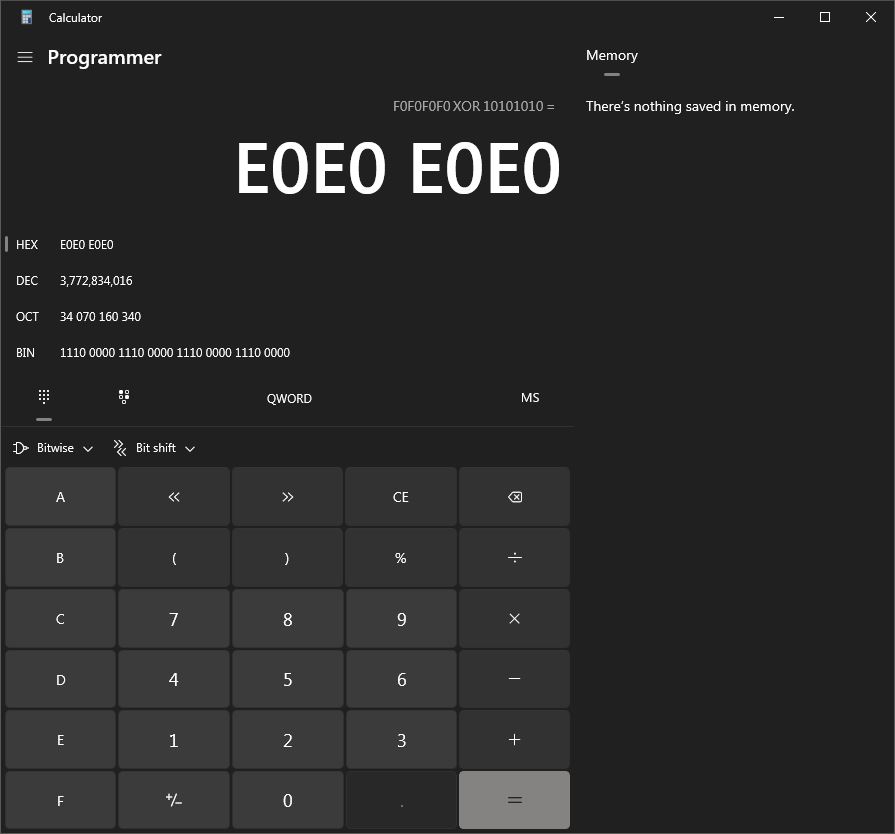
Knowing the Windows Calculator Keyboard Shortcuts can significantly improve and enhance Windows Calculator software application ease of use. The table below provides improved keyboard shortcut documentation for the Microsoft Windows Calculator software application. The keyboard shortcuts for software applications such as the Windows Calculator, are keyboard keys, and sometimes combinations of computer keyboard keys, that provide alternatives to, and often faster alternatives to, performing the same tasks with a computer mouse.
The table below containing the Windows Calculator application keyboard shortcuts is hopefully helpful since Microsoft's own documentation for it is deficient. The keyboard shortcut list for the Windows Calculator application that is provided by Microsoft on its website isn't very well organized. In addition, the Windows Calculator keyboard shortcut list provided by Microsoft does not include some of the application's important shortcuts. Worse yet, the Windows Calculator keyboard shortcut list provided by Microsoft does not include explanatory notes or annotations.
The keyboard shortcut table below also contains keyboard shortcuts that Microsoft's list of keyboard shortcuts for the Calculator app does not include. The Windows Calculator keyboard shortcut table below is also hopefully more complete, and helpful to anyone who uses the Windows Calculator app frequently. The Windows Calculator keyboard shortcut table below also includes the various Calculator modes in which each keyboard shortcut is available for use, such as its standard mode, programmer mode, scientific mode, and so on. Hopefully, this improved documentation is helpful for anyone who uses the Windows Calculator often, especially for software developers who use the Windows Calculator programmer mode.
| Shortcut | Action | modes available |
|---|---|---|
| Alt+1 Alt+2 Alt+3 Alt+4 Alt+5 or Ctrl+E | Change mode to … Standard Scientific Graphing Programmer Date Calculation | |
| Alt+H | Menu of all calculator modes and converters | |
| F9 * / Enter | +/− × (multiply) ÷ (divide) = (works sometimes in Prog mode) | Std, Sci, Prog |
| % | % | Std |
| % | mod | Sci |
| % | % (mod) | Prog |
| R | 1/x (reciprocal) | Std, Sci |
| V X or E | F–E (scientific notation on/off) exp (enter exponent in scientific notation) | Sci |
| Q @ | x² 2√ | Std, Sci |
| # B | x³ 3√ | Sci |
| G Ctrl+G L Ctrl+N N Y or ^ Ctrl+Y Shift+L | 2x 10x log ex ln xy y√x logyx | Sci |
| P Shift+E | π e | Sci |
| M none | →dms →deg | Sci |
| S O T J U I | Trig functions: sin cos tan cot sec csc Shift for inverse function, Ctrl for hyperbolic function, Ctrl+Shift for inverse hyperbolic. | Sci |
| F3 F4 F5 | Angles are measured in: DEG RAD GRAD | Sci |
| Shift+\ ! [ ] Shift+R | |x| (absolute value) n! (factorial) or Γ(x+1) (gamma function) ⌊x⌋ (floor) ⌈x⌉ (ceiling) rand (between 0 and 1) | Sci |
| Ctrl+M Ctrl+P Ctrl+Q Ctrl+R Ctrl+L | Memory operations: MS (Store to memory) M+ (Add to memory) M− (Subtract from memory) MR (Recall from memory) MC (Clear memory) | Std, Sci, Prog |
| F5 F6 F7 F8 | Input format: HEX DEC OCT BIN | Prog |
| F12 F2 F3 F4 | Register size: QWORD DWORD WORD BYTE | Prog |
| & | ^ ~ \ . (period) | Bitwise functions: AND OR XOR NOT NOT NAND | Prog |
| Shift+, (<) Shift+. (>) Shift+, (<) Shift+. (>) | Bit shifts, in either circular mode: RoL (Rotate left one bit) RoL (Rotate right one bit) Bit shifts, in arithmetic or logical mode: Lsh (Shift left n bits) Rsh (Shift right n bits) | Prog |
| Ctrl+H or Alt+I Ctrl+Shift+D | History list Clear the history | Std, Sci |
| Backspace Del Esc | CE (Clear current input) C (Clear calculation) | |
| Tab Space | Navigate to next button Click the button that currently has focus | |
| 0–9, A–F, =, (, and ) map to those buttons when visible. | ||
Thank you for visiting this website, my personal website, and hopefully your enjoyment the information and content shared here publicly at www.marilynperry.com.
Marilyn Perry | Wednesday, February 12, 2025